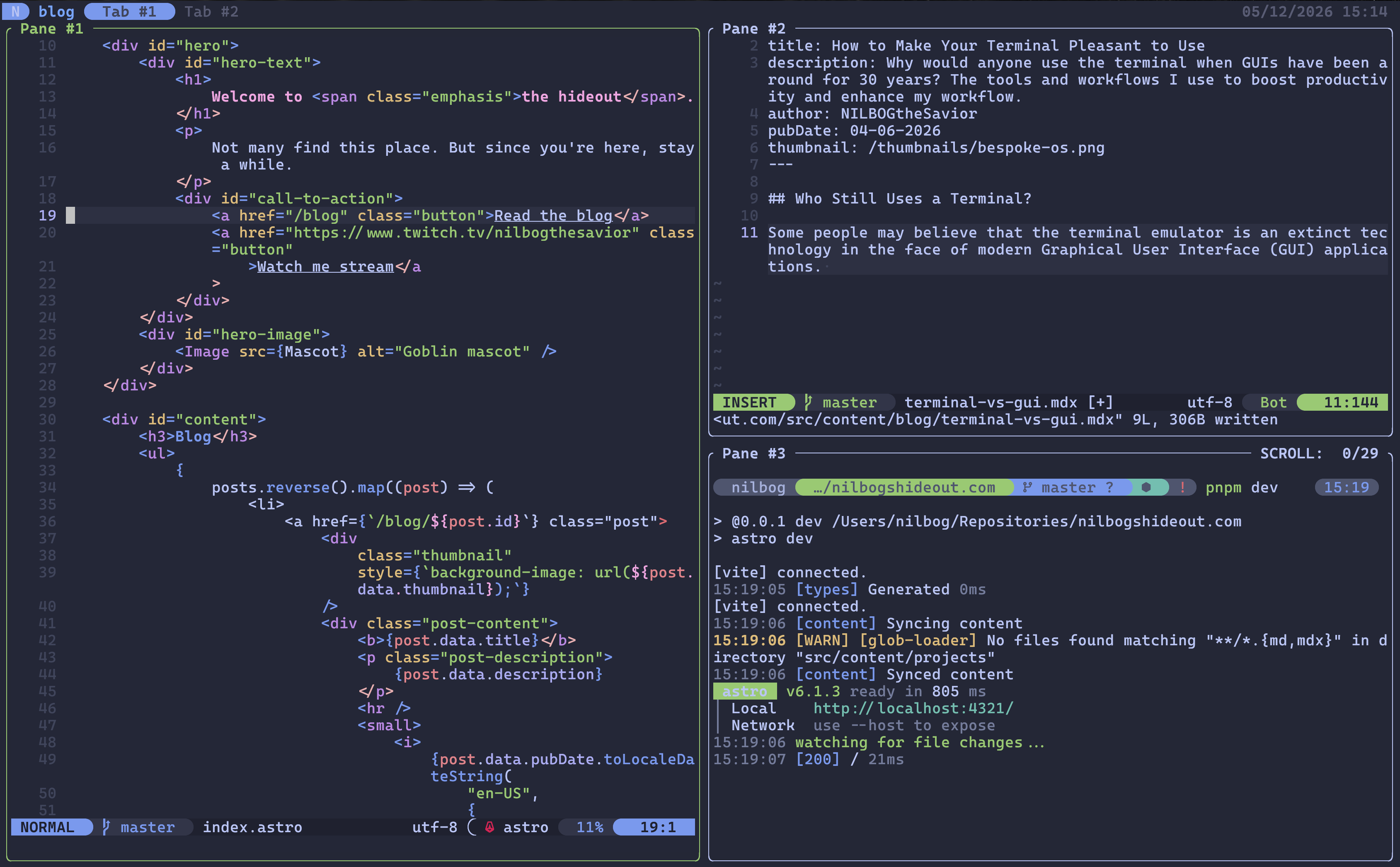
Making the Modern Terminal Pleasant to Use
The tools and workflows I use to boost productivity and enhance my workflow using the command line interface.
Introduction
Since the rise of the modern Graphical User Interface (GUI) in the 1980s, the general public ditched the intimidating Command Line Interface (CLI) for a far more accessible and convenient alternative. While the GUI allowed the masses to more readily adopt new technologies, it sacraficed many capabilities of the CLI such as digital autonomy, scripting, and the ability to handle large volumes of data.
Since the early days of computing, several tools have been developed, transforming the terminal into a highly configurable tool for power users who value performance and aesthetics. In this post I will discuss the advanteges of terminal based development as well as the modern tools that transform the terminal into a powertool.
The Terminal Emulator
When discussing the topic of making the terminal pleasant to use, upgrading the terminal emulator itself seems to be a reasonable place to start. The default terminal that comes installed with MacOS and Windows is lacking of the several customizability features that comes with open source alternatives, such as theming and keybinding. The terminal emulator is essential since the way the terminal interacts with the operating system should be unified across all systems, whether its the keybindings or the Command Line behavior.
My go to choice on Unix based systems and MacOS is Kitty terminal, a graphics accelarated terminal emulator with a highly customizable config file. The hardware acceleration makes for a smooth experience with minimal latency, especially when running iterative programs that print several lines of text to the standard output. I seldom use Windows, though when I need to, I use Alacritty, since Kitty is not available on the platform. Alacritty is performat and highly customizable, meaning that I can have it launch in Windows Subsystem for Linux (WSL2) at my root directory.
The Shell
The shell is the REPL program that runs when you launch your terminal emulator. It’s what interprets the commands and displays the results on the standard output, and is a way to automate tedious tasks using shell scripts. The most common shell is Bourne Again Shell (Bash), which is the default of most Linux distributions. ZShell (Zsh) is a more modern take with many improvements and quality of life features. Zsh also is the default shell on MacOS.
I have now made Zsh my shell across all devices due to the several features that are missing from Bash, such as syntax highlighting and a decent autocomplete feature. While these are technically implementable in Bash, it requires a lot of scripting and configuration, and I did not find it reliable enough during edge cases.
Zsh has several plugin managers. OhMyZsh is highly recommended for beginners due to its feature rich, plug and play nature. However, I opted for Antidote due to the simple plugin installation process. I personally prefer a higher level of control than OhMyZsh provides, however, for exploring the potential features of Zsh, it’s a good choice.
The Text Editor
A terminal based text editor is an essential component for any developer that experiments with systems and servers. Compared to a GUI text editor such as VS Code, a TUI based editor is faster, more versatile, and can be used on remote systems via SSH. It is especially handy while troubleshooting systems issues from the TeleTYpe (TTY) interface.
Neovim is a modern, modal text editor. It’s a fully-featured form of Vim that relies on a community of contributors for development of the editor itself, as well as the massive ecosystem of plugins that transform Neovim into a moden Integrated Development Environment (IDE). Neovim plugins diminish the line between a GUI and a TUI, from a file tree to Language Server Protocol (LSP) and Debug Adapter Protocol (DAP), a well configured Neovim installation exceeds traditional IDEs in both performance and user satisfaction. Vim bindings are also extremely handy when working in a mousless environment, and will certainly benefit users when working in other TUI applications.
--- Checkpoint
The Terminal Multiplexer
The multiplexer was my most recent addition to the techstack, and yes, it is as cool as it sounds. A terminal multiplexer allows you to effectively make use of tabs and panes, as well as allow you to store and save your workspaces, known as sessionizing. This means that, even after restarting your computer, you can run the terminal multiplexer and reload a session, which picks up where you left off.
There are two big players in the multiplexing game, TMUX, a reliable and established multiplexer that has been around for years, and Zellij, a relatively new multiplexer that relies on the community (community driven) to create plugins to enhance the experience. Similar to Neovim, I decided to go with Zellij due to the universal nature of the plugins and ability to build a config once and use it everywhere, rather than relying on shell scripts as you would have to do with TMUX.
The Terminal Prompt
The terminal prompt is not for everyone. There are some people who only value performance and don’t care about aesthetics. I personally like to find a healthy balance between the two. The terminal prompt replaces the default prompt in your terminal, allowing you to add colors, information such as GIT information, Node.js information, and more.
The terminal prompt that I use is Starship, due to its speed and easy config file. There are other
Modern Takes on Common Terminal Tools
lsd - an ls alternative
lsd is a visual upgrade over the ls command, with improved coloring, icons, and some enhanced functionality, such as listing directory trees.
bat - a cat alternative
bat improves on the functionality of cat. It is referred to cat with wings. Not only does it implement syntax highlighting, it also adds more useful features such as line numbers and paging.
fzf - a blazingly fast fuzzy finder
fzf allows you to search through anything in your terminal, from files to program outputs to your filesystem. It’s simple design philosophy makes it easy to use and fast as hell, since it does one thing and one thing only.
ripgrep - a faster grep alternative
‘ripgrep’ is a modern reinterpretation of grep, with enhanced aesthetics, smarter searching, and faster performance.